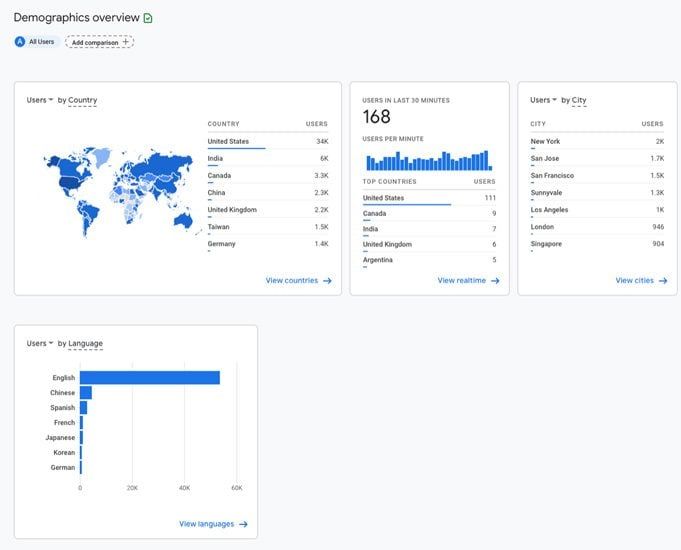

In many projects, the “geography” section in GA4 tells one story, while the CRM shows another. Customers that the CRM logs as being in Germany show up in GA4 as Poland. A big chunk of traffic suddenly looks like it comes from the US, even though sales are clearly in Europe.
The cause? Different methods of detecting location, combined with VPNs, proxies, and the limits of GeoIP.
Why is this a problem?
GA4 and CRM don’t define geography the same way:
• GA4 relies on IP-based principle.
• CRM often uses billing or shipping addresses.
• VPNs and proxies distort the signals even further.
The result is mismatched audience segmentation, misleading performance reports, and marketing campaigns that optimize for the wrong regions. I’ve seen entire budgets redirected to “top markets” that turned out to be VPN clusters.
Geography only works as a decision-making tool if it’s consistent across systems. Without a unified approach, GA4 and CRM will always contradict each other — and the business won’t know which picture to trust.
So how do you fix it?
When I tackle this issue with clients, the steps are clear:
• Feel free to hire an expert and с hoose a primary source of truth for geography (e.g., CRM address data).
• Define mapping rules to align GA4’s GeoIP with CRM fields.
• Build reconciliation dashboards to highlight mismatches.
• Test the process on one customer segment before scaling.
• Document the entire approach so the team knows which rules apply.
Only then can “geography” become an asset instead of a source of confusion.
Want a stronger data analyst role or a raise? Grab the FREE Product Analyst Playbook and get the exact roadmap to your next offer.