
Why does BigQuery get expensive?
BigQuery is powerful, but it charges per byte scanned. Many teams run “quick” queries across months or years of GA4 exports. Multiply that habit by dozens of analysts and suddenly your budget is leaking.
What mistakes cause waste?
• Forgetting to filter by date or partition
• Running full scans just to test syntax
• Ignoring clustering on frequently used columns
The result? Slow queries and bloated invoices.
How can you fix it?
Focus on simple optimizations:
• Use partition filters to keep time windows narrow
• Cluster columns like event_name or user_id for recurring queries
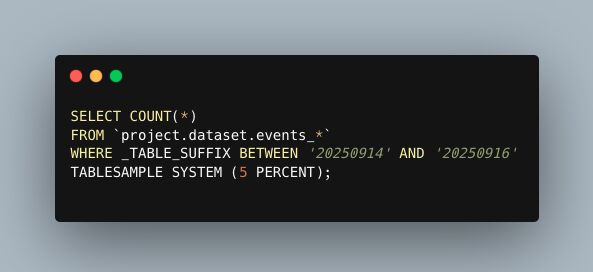
• Test ideas with LIMIT or TABLESAMPLE before running full scale
What’s the takeaway?
Efficient SQL isn’t just faster—it’s cheaper. Make partition filters and clustering part of your standard process, and you’ll keep analysis lean without sacrificing depth.
Want a stronger data analyst role or a raise? Grab the FREE Product Analyst Playbook and get the exact roadmap to your next offer.