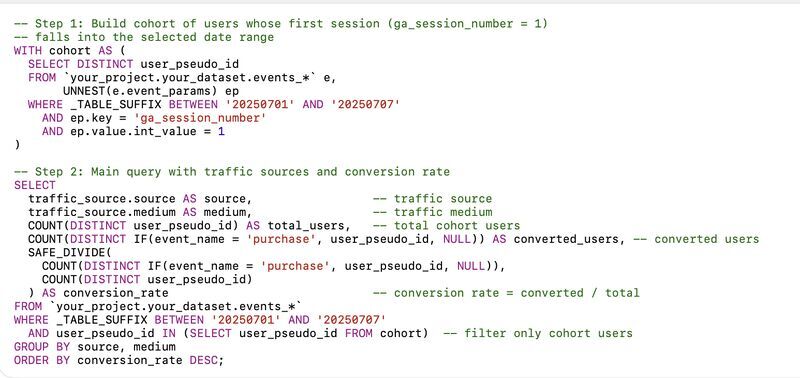

If you try to evaluate channel performance directly in GA4, the interface gives you an instant Conversion Rate number. But once you move into BigQuery, the simplicity disappears, and you’re left with raw data and the need to build the logic yourself.
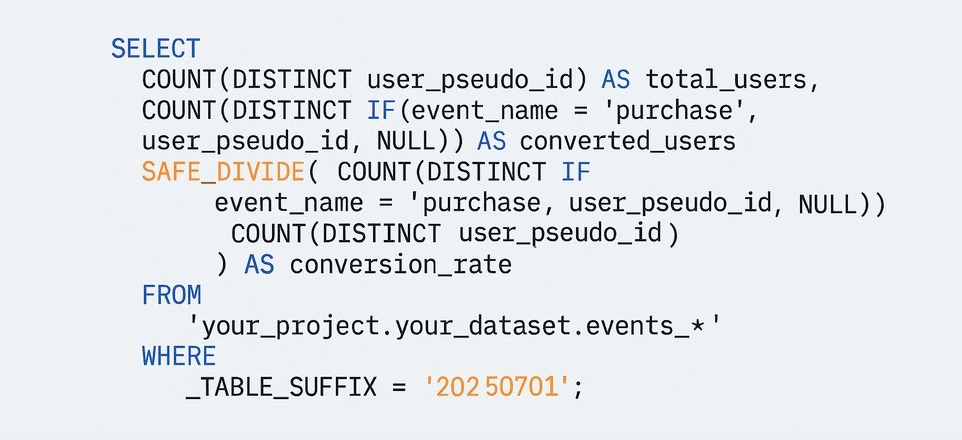
At its core, Conversion Rate relies on a simple relationship: converted users ÷ total users.
The moment you break this down by acquisition channel, session source, or campaign, the calculation becomes more nuanced.
What BigQuery requires:
• Identify the event or action you consider a conversion
• Extract traffic-source metadata (source, medium, campaign)
• Group users by these dimensions
• Count how many users arrived from each channel
• Count how many of those converted
• Apply SAFE_DIVIDE to avoid division errors
Key considerations:
• traffic_source is usually set at the moment of first arrival, which means you’re effectively building a first-touch view unless you extract UTM data from event-level parameters
• Multi-touch journeys require additional stitching logic if CRM or external identifiers are involved
• Channels with high traffic may not contribute proportionally to conversions once the SQL reflects what actually happened
The result is often eye-opening: channels that look strong in GA4’s UI may underperform when analyzed at the user level in BigQuery.
Want a stronger data analyst role or a raise? Grab the FREE Product Analyst Playbook and get the exact roadmap to your next offer.