
At first glance, it sounds simple: take the total revenue, divide by the number of orders, and boom — you’ve got your AOV (Average Order Value). That works in fairytales… or in the GA4 interface, where metrics calculate themselves.
But in BigQuery? If you want the truth, bring SQL — and strong coffee.
What is AOV? AOV = Total Revenue / Number of Orders
Easy enough — until you actually try to calculate it.
So, what’s the catch?
• Total revenue isn’t just one field. In GA4, it might come through as value or purchase_revenue. Sometimes it hides in ecommerce.value, especially if you're using items.
• Number of orders isn’t always the number of purchase events. Technically, yes — but to avoid duplicates (e.g. from retries), it’s safer to count unique transaction_ids.
How to do it right:
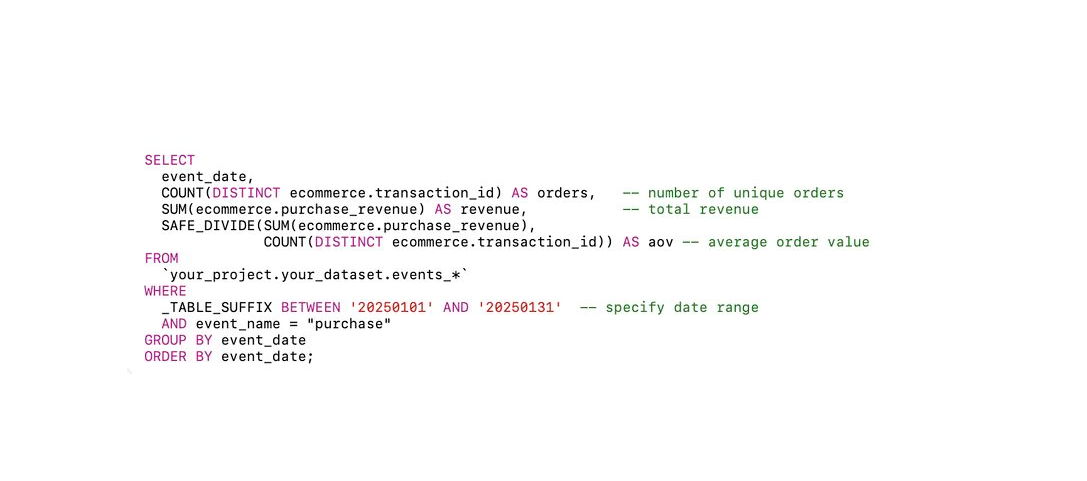
1. Filter for purchase events.
2. Extract value from dimension u you use for revenue metric. Yes, it could be different
3. Group by day (or whatever interval you need).
4. Sum the values and divide by the number of unique orders.
Takeaway:
GA4 calculates AOV — but it does it its way. BigQuery lets you calculate it your way: by user, by session, by brand — whatever makes sense for your business.
Just remember: SQL isn’t about magic. It’s about precision.
Want a stronger data analyst role or a raise? Grab the FREE Product Analyst Playbook and get the exact roadmap to your next offer.