
The GA4 interface happily shows you a session count. But once you open the export in BigQuery, there is no “sessions” table waiting for you. All you see are events, and you have to define what a session is yourself.
In GA4, a session is essentially the combination of:
• user_pseudo_id (the user key)
• ga_session_id (the per-user session identifier)
Together, they form a unique session key. That is enough to reconstruct sessions from raw events.
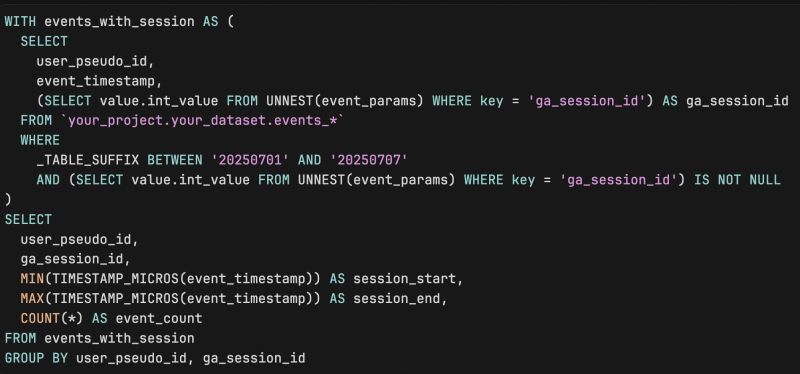
A simple pattern:
• select events where ga_session_id is present
• group by user_pseudo_id and ga_session_id
• calculate:
- minimum event_timestamp as session start
- maximum event_timestamp as session end
- number of events in the session
- optionally, an array of event names to see what happened
From there, you can derive session duration, attach traffic source fields, and build any session-level metric you want - without depending on session_start or other convenience events that may be missing.
Once you’ve done this once, you stop treating GA4’s “sessions” number as something mysterious and start seeing it as a reconstructable artifact of the underlying data.
Want a stronger data analyst role or a raise? Grab the FREE Product Analyst Playbook and get the exact roadmap to your next offer.